Brilliant Brand Name Development For Companies, Products & Services

Transform your business or organization name into a brand.

Our Communcation on the Go Package is just $125 a Month

For email, phone, sms, fax and calendar.

IT for Business

Cloud based, enterprise class IT solutions integrated with Alfresco.

Remote and Onsite Tech Support Services

Any of these services are $70 plus price of software or equipment.

Technology Solutions

Login to access your office or media files from any location.

We develop fast loading, cross-browser and device supported websites.

Nexwrx has a different approach to web design.

Let your Social Media work for you

Use social media for a more effective marketing solution.

Showing posts with label Technology Solutions. Show all posts

Tuesday, January 15, 2013

Smart Homes

Smart Homes and Commercial Buildings

A Smart Home or Building is a home or building, usually a new one, that is equipped with special structured wiring to enable occupants to remotely control or program an array of automated home electronic devices by entering a single command. For example, a homeowner on vacation can use a Touchtone phone to arm a home security system, control temperature gauges, switch appliances on or off, control lighting, program a home theater or entertainment system, and perform many other tasks.

The field of home automation is expanding rapidly as electronic technologies converge. The home network encompasses communications, entertainment, security, convenience, and information systems.

A technology known as Powerline Carrier Systems (PCS) is used to send coded signals along a home's existing electric wiring to programmable switches, or outlets. These signals convey commands that correspond to "addresses" or locations of specific devices, and that control how and when those devices operate. A PCS transmitter, for instance, can send a signal along a home's wiring, and a receiver plugged into any electric outlet in the home could receive that signal and operate the appliance to which it is attached.

Nexwrx is a consultant for Smart home/Commercial Building installation and integration. We will work inside your budget to support and install all of your smarthome devices. We will use licensed and professional installers working with our design team to ensure that your state of the art technology is implemented properly.  Let us know what you want in terms of technology and we will find the best possible solution to make your dreams come true.

Custom Overview

Nexwrx designs custom media packages for the home and small business.  Since each client needs are different we will have to quote for our pricing.

Some of our Custom Media Packages include:
  • Communications Server - Video VOIP Telephony and Conferencing Solution.  Learn more.
  • Video Web Broadcasting Server - Video Conferencing via a IP Camera via web browser.  Learn more.
  • Collaboration, Document Management and Email Server - using Zimbra and Alfresco software solutions to manage your organization's media and email.  Learn more.
  • Audio Streaming Broadcast Server - Stream live concerts and events, podcasts, internet radio and manage media from very own server.  Learn more. 
  • NAS Storage Server - Network Attached Storage for document and media organization on a cloud.  Learn more. 
  • Pre-Built LAMP w/ FTP - Includes BIND, DNS and SMTP Only Email Solutions.  Learn More.


NAS

A Network Attached Storage  (NAS) is file-level computer data storage connected to a computer network providing data access to a heterogeneous group of clients. NAS not only operates as a file server, but is specialized for this task either by its hardware, software, or configuration of those elements. NAS is often manufactured as a computer appliance – a specialized computer built from the ground up for storing and serving files – rather than simply a general purpose computer being used for the role.  NAS devices are gaining popularity, as a convenient method of sharing files among multiple computers.  Potential benefits of network-attached storage, compared to file servers, include faster data access, easier administration, and simple configuration.

NAS systems are networked appliances which contain one or more hard drives, often arranged into logical, redundant storage containers or RAID. Network-attached storage removes the responsibility of file serving from other servers on the network. They typically provide access to files using network file sharing protocols such as NFS, SMB/CIFS, or AFP.

Monday, January 14, 2013

CCTV Monitoring

CCTV Monitoring for Home and Business

Closed-Circuit Television (CCTV) cameras can produce images or recordings for surveillance purposes, and can be either video cameras, or digital stills cameras.  Video cameras are either analogue or digital, which means that they work on the basis of sending analogue or digital signals to a storage device such as a video tape recorder or desktop computer or laptop computer.

Analog Cameras - can record straight to a video tape recorder which are able to record analogue signals as pictures. If the analogue signals are recorded to tape, then the tape must run at a very slow speed in order to operate continuously. Analogue signals can also be converted into a digital signal to enable the recordings to be stored on a PC as digital recordings. In that case the analogue video camera must be plugged directly into a video capture card in the computer, and the card then converts the analogue signal to digital. These cards are relatively cheap, but inevitably the resulting digital signals are compressed 5:1 (MPEG compression) in order for the video recordings to be saved on a continuous basis.

Another way to store recordings on a non-analogue media is through the use of a digital video recorder (DVR). Such a device is similar in functionality to a PC with a capture card and appropriate video recording software. Unlike PCs, most DVRs designed for CCTV purposes are embedded devices that require less maintenance and simpler setup than a PC-based solution, for a medium to large number of analogue cameras. Ask us about our DVR media storage devices.

Some DVRs also allow digital broadcasting of the video signal, thus acting like a network camera. If a device does allow broadcasting of the video, but does not record it, then it's called a video server. These devices effectively turn any analogue camera (or any analogue video signal) into a network TV.

Digital Video Cameras - Do not require a video capture card because they work using a digital signal which can be saved directly to a computer. The signal is compressed 5:1, but DVD quality can be achieved with more compression (MPEG-2 is standard for DVD-video, and has a higher compression ratio than 5:1, with a slightly lower video quality than 5:1 at best, and is adjustable for the amount of space to be taken up versus the quality of picture needed or desired). The highest picture quality of DVD is only slightly lower than the quality of basic 5:1-compression DV.

Saving uncompressed digital recordings takes up an enormous amount of hard drive space, and a few hours of uncompressed video could quickly fill up a hard drive. Holiday uncompressed recordings may look fine but one could not run uncompressed quality recordings on a continuous basis. Motion detection is therefore sometimes used as a work around solution to record in uncompressed quality.
However, in any situation where standard-definition video cameras are used, the quality is going to be poor because the maximum pixel resolution of the image chips in most of these devices is 320,000 pixels (analogue quality is measured in TV lines but the results are the same); they generally capture horizontal and vertical fields of lines and blend them together to make a single frame; the maximum frame rate is normally 30 frames per second.

That said, multi-megapixel IP-CCTV cameras are coming on the market. Still quite expensive, but they can capture video images at resolutions of 1, 2, 3, 5 and even up to 11 Mpix. Unlike with analogue cameras, details such as number plates are easily readable. At 11 Mpix, forensic quality images are made where each hand on a person can be distinguished. Because of the much higher resolutions available with these types of cameras, they can be set up to cover a wide area where normally several analogue cameras would have been needed.

Network - IP cameras or network cameras are analogue or digital video cameras, plus an embedded video server having an IP address, capable of streaming the video (and sometimes, even audio).
Because network cameras are embedded devices, and do not need to output an analogue signal, resolutions higher than CCTV analogue cameras are possible. An analogue or digital camera connected to a video server acts as a network camera, but the image size is restricted to that of the video standard of the camera. However, optics (lenses and image sensors), not video resolution, are the components that determine the image quality.

Network cameras can be used for very cheap surveillance solutions (requiring one network camera, some Ethernet cabling, and one PC), or to replace entire CCTV installations (cameras become network cameras, tape recorders become DVRs, and CCTV monitors become computers with TFT screens and specialised software. Digital video manufacturers claim that turning CCTV installations into digital video installations is inherently better).

WIFI Overview

Firewalls, Routers, Wireless Access Points and HotSpots - What's the difference?

A firewall can either be software-based or hardware-based and is used to help keep a network secure. Its primary objective is to control the incoming and outgoing network traffic by analyzing the data packets and determining whether it should be allowed through or not, based on a predetermined rule set. 

A router is a device that forwards data packets between computer networks, creating an overlay internetwork. A router is connected to two or more data lines from different networks. When a data packet comes in one of the lines, the router reads the address information in the packet to determine its ultimate destination. Then, using information in its routing table or routing policy, it directs the packet to the next network on its journey. Routers perform the "traffic directing" functions on the Internet. A data packet is typically forwarded from one router to another through the networks that constitute the internetwork until it gets to its destination node.

A wireless router is a device that performs the functions of a router but also includes the functions of a wireless access point and a network switch. It is commonly used to provide access to the Internet or a computer network. It does not require a wired link, as the connection is made wirelessly, via radio waves. It can function in a wired LAN (local area network), in a wireless-only LAN (WLAN), or in a mixed wired/wireless network, depending on the manufacturer and model.  Learn more.

Most current wireless routers have the following characteristics:

  • LAN ports which function in the same manner as the ports of a network switch.
  • A WAN port which connects to a wide area network, typically one with Internet access. External destinations are accessed using this port.
  • A wireless antenna that allows connections to other wireless devices, such as NiCs, wireless repeaters, wireless access points, and wireless bridges. This antenna typically uses the Wi-Fi standard.
  • Wireless router has many types of security for different manufacturers.
A wireless access point (AP) is a device that allows wireless devices to connect to a wired network using Wi-Fi, or related standards. The AP usually connects to a router (via a wired network) if it's a standalone device, or is part of a router itself.  Learn more.

A hotspot is a site that offers Internet access over a wireless local area network through the use of a router connected to a link to an Internet service provider. Hotspots typically use Wi-Fi technology. Learn more.

Wi-Fi (also spelled Wifi or WiFi) is a popular technology that allows an electronic device to exchange data wirelessly (using radio waves) over a computer network, including high-speed Internet connections.

Wifi Devices are electronic devices that connect to the internet via wifi technology.  Learn more. 

IP Camera Monitoring

IP Camera Based Surveillance Monitoring 

For Mac and Windows OS we use Lorex Systems
For parents, homeowners, pet owners and caregivers instant wireless video monitoring solutions provide a much-needed extra pair of eyes, delivering the confidence you seek to connect and monitor the most important things in your busy lives, without being tethered. Video monitoring puts you in control, connecting you to multiple rooms with one quick view.  You can go about your busy day and still being able to keep a vigilant eye on all you hold dear.

Security Monitoring for Your Home

Don’t leave your home’s security to chance. Our home monitoring system provides ultimate coverage at an affordable price, allowing you to monitor and protect your home, family, and property. Outdoor Cameras with Motion offer a perfect solution for your home security needs, our indoor and outdoor wireless cameras are up in a snap, with no video cables and no painful set-up woes to worry about. Featuring long-range secure wireless communication, an exclusive built-in automatic infrared camera lens filter with accurate color reproduction night vision, and advanced PIR motion sensors.

All-In-One Monitor & Recording Solution

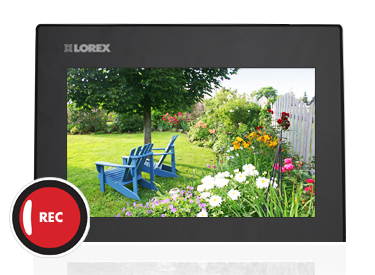
Our monitor doubles as an integrated DVR, with SD™ recording capability of up to 16GB. Plug this system into any power outlet in your home, and you’re set. Multiple recording options allow you to operate manually, only during motion detection, or on a set schedule, with all your recordings conveniently time and date stamped. It’s so easy, just open the box and you’re ready to go!

Intercom Feature

You’re never out of touch with our two-way audio system, allowing you to communicate with those you’re watching. Speakers and microphones built into our cameras make it easy to keep in touch; no longer do you have to shout out loud to all the kids to come down for dinner. The next best thing to being there.

Home and Care Monitoring 

Our baby monitors are simple and an elegant way to keep an eye on your child, day or night, from wherever you are. Using our night vision settings you will always have a crisp, clear picture even in low-light conditions. When you activate sleep mode, the monitor screen turns off, but the audio remains on, so you can still stay in touch with your baby while getting the rest you need. Now, no matter where you are in the house or what you’re doing, you can talk to your child with our special two-way talk feature, putting you in the room instantly with the push of a button. 

Connecting with relatives – and ensuring their comfort and safety – is only the push of a button away. Caring for an elderly relative can be difficult, especially when you’re trying to satisfy all the competing demands of career, family, and life. While at home, caregivers can use the compact handheld monitor for keeping an eye that everything is okay. But when you need to step out, all you need to do is log in to a web browser application that is accessible by PC, tablet or smartphone. Whether you’re halfway around the world or just a room away, you can check in at any time and ensure your family members are safe and secure. 

Pet Monitoring

Have you ever wanted to have a moment with your dog or cat when you were away at work, or on vacation? Now you can, as our system allows you to connect with your pet as much as you want, whenever you want, using your compatible smartphone, tablet, PC, or Mac. You’ll enjoy a live video and audio feed wherever you are, making you feel more connected and in touch with your beloved animal companion.


There are several types of IP Cameras for home and business. Every client is different and needs are based on several factors.  Learn more.

Surveillance Overview

There are two types of Surveillance Solutions that Nexwrx offers its clients. We can monitor your computer system internally or we set up a system where you'll be able to monitor your property via IP and CCTV systems via recording to a desktop and viewable by way of web browser for easy access.

The difference between the two is that usually a parent may want to monitor or restrict their children's access on the internet or observe what they are doing while online. A business may want to limit their employees access to time wasting applications or working for other company's on their own time. Which is stealing from their employer. If a company has had several internet security breaches, they may want to monitor who is doing unsafe activities online and put a stop to it. There are many reasons for wanting to install cyber monitoring devices for the home and business.  Learn more.

Some businesses will want to add infrastructure monitoring to catch threats, security breaches or threats, and system failures before they happen. Nexwrx can monitor your IT with alerts and restore points.  Learn more.

When it comes to monitoring your personal or business property, you will want a system that records and stores vital information that can help police officials and investigators recover your lost property. By installing a video based surveillance system you will have the ability to monitor and record all activity automatically. For parents who are away from home a great deal, you may want to monitor your child care or the care provided to an elderly parent. There are many uses for surveillance systems.
Learn more.

Closed-circuit television (CCTV) is the use of video cameras to transmit a signal to a specific place, on a limited set of monitors. It differs from broadcast television in that the signal is not openly transmitted, though it may employ point to point (P2P), point to multipoint, or mesh wireless links.  Learn more.

We realize that most businesses use Windows or Mac supported products but we also carry Linux software distributions. Depending on what type of system you already have we will work with you to find a unique system that offers the best solution to fit your needs. Please take a look at some of our Surveillance Solution Features, but because every situation is different our prices are custom per order basis and will have to be assessed before a quote can be given.

Sunday, January 13, 2013

VPN

Virtual Private Network

VPNs, Virtual Private Networks, are commonly requested by all types of different companies. Applications to be used by a particular company simply don’t require any specific QoS (Quality of Service) or the latencies demanded don’t need to be extremely low. In some occasions they may be looking to backup their primary MPLS (Short for Multiprotocol Label Switching) network through IPsec, which will transmit over the public internet but always keeping the data safe and secure, key demands for all businesses. In all situations it may be interesting to implement a VPN.

As a VNO, we are constantly requested to provide internet access in hundreds of countries around the globe. Most of these international connection requests are meant to be used with an IPsec (Internet Protocol Security) router laying behind with the idea of creating a VPN between two or more international delegations. The concept VPN is therefore extremely important to comprehend.

A Virtual Private Networks extends a private network and the resources contained in the network across public networks like the Internet. It enables a host computer to send and receive data across shared or public networks as if it were a private network with all the functionality, security and management policies of the private network.

This is done by establishing a virtual point-to-point connection through the use of dedicated connections, encryption, or a combination of the two. The VPN connection across the Internet is technically a wide area network (WAN) link between the sites but appears to the user as a private network link—hence the name "virtual private network".

Nexwrx can setup VPN access for your business and connect you through access points for home or mobile connection so that you can access your business computer and files, regardless of where you are.

Types of VPNs

VPNs can be either remote-access (connecting an individual computer to a network) or site-to-site (connecting two networks together). In a corporate setting, remote-access VPNs allow employees to access their company's intranet from home or while traveling outside the office, and site-to-site VPNs allow employees in geographically separated offices to share one cohesive virtual network. A VPN can also be used to interconnect two similar networks over a dissimilar middle network; for example, two IPv6 networks over an IPv4 network.

VPN systems can be classified by

  • the protocols used to tunnel the traffic
  • the tunnel's termination point, i.e., customer edge or network-provider edge
  • whether they offer site-to-site or remote-access connectivity
  • the levels of security provided
  • the OSI layer they present to the connecting network, such as Layer 2 circuits or Layer 3 network connectivity

Security Mechanisms

VPNs typically require remote access to be authenticated and make use of encryption techniques to prevent disclosure of private information. VPNs provide security through tunneling protocols and security procedures such as encryption. Their security model provides:
  • Confidentiality such that even if traffic is sniffed, an attacker would only see encrypted data which they cannot understand
  • Allowing sender authentication to prevent unauthorized users from accessing the VPN
  • Message integrity to detect any instances of transmitted messages having been tampered with

Secure VPN protocols include the following

  • IPSec (Internet Protocol Security) was developed by the Internet Engineering Task Force (IETF), and was initially developed for IPv6, which requires it. This standards-based security protocol is also widely used with IPv4. Layer 2 Tunneling Protocol frequently runs over IPSec. Its design meets most security goals: authentication, integrity, and confidentiality. IPSec functions through encrypting and encapsulating an IP packet inside an IPSec packet. De-encapsulation happens at the end of the tunnel, where the original IP packet is decrypted and forwarded to its intended destination.
  • Transport Layer Security (SSL/TLS) can tunnel an entire network's traffic, as it does in the OpenVPN project, or secure an individual connection. A number of vendors provide remote access VPN capabilities through SSL. An SSL VPN can connect from locations where IPsec runs into trouble with Network Address Translation and firewall rules.
  • Datagram Transport Layer Security (DTLS), is used in Cisco AnyConnect VPN, to solve the issues SSL/TLS has with tunneling over UDP.
  • Microsoft Point-to-Point Encryption (MPPE) works with the Point-to-Point Tunneling Protocol and in several compatible implementations on other platforms.
  • Microsoft's Secure Socket Tunneling Protocol (SSTP), introduced in Windows Server 2008 and in Windows Vista Service Pack 1. SSTP tunnels Point-to-Point Protocol (PPP) or Layer 2 Tunneling Protocol traffic through an SSL 3.0 channel.
  • MPVPN (Multi Path Virtual Private Network). Ragula Systems Development Company owns the registered trademark "MPVPN".
  • Secure Shell (SSH) VPN - OpenSSH offers VPN tunneling (distinct from port forwarding) to secure remote connections to a network or inter-network links. OpenSSH server provides a limited number of concurrent tunnels and the VPN feature itself does not support personal authentication.

Authentication

  • Tunnel endpoints must authenticate before secure VPN tunnels can be established.
  • User-created remote access VPNs may use passwords, biometrics, two-factor authentication or other cryptographic methods.
  • Network-to-network tunnels often use passwords or digital certificates, as they permanently store the key to allow the tunnel to establish automatically and without intervention from the user.

VPNs in Mobile Environments

Mobile VPNs are used in a setting where an endpoint of the VPN is not fixed to a single IP address, but instead roams across various networks such as data networks from cellular carriers or between multiple Wi-Fi access points. Mobile VPNs have been widely used in public safety, where they give law enforcement officers access to mission-critical applications, such as computer-assisted dispatch and criminal databases, while they travel between different subnets of a mobile network.

They are also used in field service management and by healthcare organizations, among other industries. Increasingly, mobile VPNs are being adopted by mobile professionals and white-collar workers who need reliable connections. They are used for roaming seamlessly across networks and in and out of wireless-coverage areas without losing application sessions or dropping the secure VPN session. A conventional VPN cannot survive such events because the network tunnel is disrupted, causing applications to disconnect, time out, or fail, or even cause the computing device itself to crash.

Instead of logically tying the endpoint of the network tunnel to the physical IP address, each tunnel is bound to a permanently associated IP address at the device. The mobile VPN software handles the necessary network authentication and maintains the network sessions in a manner transparent to the application and the user. 

Firewall

Firewall

A firewall can either be software-based or hardware-based and is used to help keep a network secure. Its primary objective is to control the incoming and outgoing network traffic by analyzing the data packets and determining whether it should be allowed through or not, based on a predetermined rule set. A network's firewall builds a bridge between an internal network that is assumed to be secure and trusted, and another network, usually an external (inter) network, such as the Internet, that is not assumed to be secure and trusted.

Many personal computer operating systems include software-based firewalls to protect against threats from the public Internet. Many routers that pass data between networks contain firewall components and, conversely, many firewalls can perform basic routing functions.

With the new Smart Wi-Fi Routers, users will enjoy incredibly fast Wi-Fi speeds with exceptional in-house Wi-Fi coverage. With simplified installation that can be completed in a matter of minutes, VPNs, Nexwrx will have your home devices connected in no time. The routers offer new tools for home network monitoring and control, and new mobile apps for anytime, anywhere remote access of files, photos, videos, music and more.

For home network devices we use Cisco firewall routers.  Learn more.

Types of Business Class Firewalls

Network-Level - Firewalls that work at the network level inspect packet headers and filter traffic based on the source and destination computer's IP address, the port used and the service requested. The first commercially available network protection devices were network-level firewalls. These firewalls also could monitor and filter traffic based on different protocols, a specified domain name or other attributes associated with a source. Most modern routers contain network-level firewalls, but they do not understand languages such as hypertext markup language (HTML) or extensible markup language (XML).

Circuit-Level Gateway - The circuit-level gateway firewall works at the session layer of the open systems interconnection (OSI) model or at the transmission control protocol/Internet protocol layer (TCP/IP). Circuit-level gateway firewalls determine the legitimacy of a requested session by monitoring the handshake between packets. The handshake process consists of three steps--device one sends specific segments of information, combined in a packet, to device two; device two responds to device one with its specific packets of information; and then device one acknowledges and validates receipt of the information. A circuit level firewall can hide the network from the outside world and also restrict the session rules to known computers. Typically, circuit-level gateways cost less than other forms of firewall protection.

Application-Level Gateway - Application-level gateways, most commonly known as proxies, work in a similar fashion as the circuit-level gateway except they work on specific applications. Application-level gateways protect the network from malicious attacks, spam and viruses. Application-level gateways configured as a web proxy do not allow ftp, gopher, telnet or any other traffic through the firewall. These firewalls also block websites based on content and not a website's IP address. Because application-level gateways thoroughly examine packets of data, it takes longer for information to pass through these firewalls. Application-level gateways also require manual configuration on each user system and have zero transparency to the user.

Stateful Multilayer Gateways - Stateful multilayer (SML) gateways offer the best features of the three other firewall types--they filter packets at the network layer, they determine packet legitimacy and they evaluate packet contents at the application layer. SML gateways also provide a direct connection between the host and the client. This allows for transparency at the user level, unlike the application-level gateway. Because SML gateways do not use proxies, they work faster than their application-layer counterparts. But because they still offer the deep inspection of an application-layer gateway, they typically cost more.

Business or Upgraded Security for Home Class Firewall

For upgraded security at home or Business class firewall protection we suggest using a Dell SonicWall Firewall for hardwired and Cisco Sonic Access Point for wireless. Depending on how you use technology will define what you need for enhanced security and protection. 

ICSA Labs (International Computer Security Association) began as NCSA (National Computer Security Association). Its mission was to increase awareness of the need for computer security and to provide education about various security products and technologies.  ICSA Labs is currently an independent division of Verizon Business providing resources for research, intelligence, certification and testing of products, including anti-virus, firewall, IPsec VPN, cryptography, SSL VPN, network IPS, anti-spyware and PC firewall products.


Dell SonicWALL is the only firewall to receive the ICSA Labs Enterprise Firewall Certification and ICSA Labs Next-Generation Firewall Evaluation.  Learn more.

Sunday, December 2, 2012

Printers & Scanners

Setting up wireless or network printers and scanners for mobile devices, home or business.

Printers

A printer is a peripheral which produces a representation of an electronic document on physical media such as paper or transparency film. Many printers are local peripherals connected directly to a nearby personal computer. Individual printers are often designed to support both local and network connected users at the same time. Some printers can print documents stored on memory cards or from digital cameras and scanners.

Multifunction Printers - (MFPs) include a scanner and can copy paper documents or send a fax; these are also called multi-function devices (MFD), or all-in-one (AIO) printers. Most MFPs include printing, scanning, and copying among their many features.

Laser Printer - Produces high quality text and graphics. As with digital photocopiers and multifunction printers (MFPs), laser printers employ a xerographic printing process but differ from analog photocopiers in that the image is produced by the direct scanning of a laser beam across the printer's photoreceptor.

LED Printer - Uses an array of LEDs instead of a laser to cause toner adhesion to the print drum.

Liquid Inkjet Printers - Operate by propelling variably sized droplets of liquid ink onto almost any sized page. They are the most common type of computer printer used by consumers.

Scanners

A Scanner is a device that optically scans images, printed text, handwriting, or an object, and converts it to a digital image. Common examples found in offices are variations of the desktop (or flatbed) scanner where the document is placed on a glass window for scanning.

Hand-held Scanners - where the device is moved by hand, have evolved from text scanning "wands" to 3D scanners used for industrial design, reverse engineering, test and measurement, orthotics, gaming and other applications.

Mechanically Driven Scanners - move the document are typically used for large-format documents, where a flatbed design would be impractical.

Direct physical connection to a computer

The amount of data generated by a scanner can be very large: a 600 DPI 23 x 28 cm (9"x11") (slightly larger than A4 paper) uncompressed 24-bit image is about 100 megabytes of data which must be transferred and stored. Recent scanners can generate this volume of data in a matter of seconds, making a fast connection desirable.

Scanners communicate to their host computer using one of the following physical interfaces, listing from slow to fast:

Parallel Port - Connecting through a parallel port is the slowest common transfer method. Early scanners had parallel port connections that could not transfer data faster than 70 kilobytes/second. The primary advantage of the parallel port connection was economic and user skill level: it avoided adding an interface card to the computer.

GPIB - General Purpose Interface Bus. Certain drumscanners like the Howtek D4000 featured both a SCSI and GPIB interface. The latter conforms to the IEEE-488 standard, introduced in the mid ’70's. The GPIB-interface has only been used by a few scanner manufactures, mostly serving the DOS/Windows environment. For Apple Macintosh systems, National Instruments provided a NuBus GPIB interface card.

Small Computer System Interface (SCSI) - supported by most computers only via an additional SCSI interface card. Some SCSI scanners are supplied together with a dedicated SCSI card for a PC, although any SCSI controller can be used. During the evolution of the SCSI standard speeds increased, with backwards compatibility; a SCSI connection can transfer data at the highest speed which both the controller and the device support. SCSI has been largely replaced by USB and Firewire, one or both of which are directly supported by most computers, and which are easier to set up than SCSI.

Universal Serial Bus (USB)  - can transfer data quickly, and they are easier to use and cheaper than SCSI devices. The early USB 1.1 standard could transfer data at only 1.5 megabytes per second (slower than SCSI), but the later USB 2.0 standard can theoretically transfer up to 60 megabytes per second (although everyday rates are much lower), resulting in faster operation.

FireWire  - an interface that is much faster than USB 1.1 and comparable to USB 2.0. FireWire speeds are 25, 50, and 100, 400 and 800 megabits per second (but a device may not support all speeds). Also known as: IEEE-1394.  Proprietary interfaces were used on some early scanners that used a proprietary interface card rather than a standard interface.

Indirect (network) connection to a computer

Some setups allowed a single scanner connected to a host computer to function as a scanner accessible by all users within a local computer network.  All-in-one multi-purpose devices targeted to serve both (small) offices and consumers usually combine a printer, scanner, copier and fax into a single apparatus available to a whole workgroup, providing each individual fax, scan, copy and print functionality.

Game Systems

Gaming Systems Consoles or Gaming Servers

Setting up Internet support or Netflix on gaming consoles.

Nexwrx can setup your gaming systems such as Wii, Xbox or Playstation with Internet access or the ability to watch movies on Netflix. We can also custom build you a gaming server or pc for audio-graphic heavy support. Our expert technicians tweak and fully optimize every system, meaning you get performance increases that aren’t available on any other PC. Our unquenchable thirst for speed inspired us to develop our professional overclocking service and our award winning cooling solutions to ensure that our gaming desktops and servers are always rock-solid stable.

A video game console is an interactive entertainment computer or customized computer system that produces a video display signal which can be used with a display device (a television, monitor, etc.) to display a video game. The term "video game console" is used to distinguish a machine designed for people to buy and use primarily for playing video games on a TV.


Audio Video

Audio and Video Solutions

Setting up audio and video equipment, installation of hardware and software, ip based technology for small businesses, organizations or the home.


We can turn any size presentation or meeting space into a completely customized audio visual experience for corporate conferencing, training and events. We help you select equipment and services that fit into your budget and meet your unique requirements so the end result is a corporate audio visual system that puts you a step beyond the competition.

Multipurpose Auditorium - A large-venue projector, a document camera, microphones and multiple speaker sets can be installed to transform auditoriums and accommodate a full range of audio and video performances.  American Hi-Res can design and build large scale audio visual systems to suit any size auditorium or large corporate facility. Our custom auditorium audio visual systems use the latest technologies and controls to accommodate training, entertainment and company presentations at the touch of a button.

Cafeteria Audio Video Systems - We can turn your cafeteria into an interactive and enjoyable place for employees to spend down-time. Display messages and corporate information or broadcast television through customized audio visual systems in your cafeteria to increase employee morale and productivity. We can also create AV systems for your restaurant or bar areas.


Training Room - We provide a comprehensive range of audio/visual equipment needed to support any course material that may be presented during training sessions, and to ensure that trainees can interact and collaborate easily and effectively.

Classroom - Through state-of-the-art technology, a teacher's ability to communicate and reach out to students has been greatly enhanced, engaging and involving everyone in the classroom as never before. We can equip numerous classrooms, computer labs, even auditoriums with video and voice systems that take learning to a whole new level.

AV Asset Management - Large campuses require special communications systems management needs. We provide the ability to manage all the AV devices throughout large facilities with hundreds of rooms — all from any computer connection on the network.

Operations Center - Having operations centers equipped with state-of-the-art responsive monitoring command and control systems are vital to the day-to-day functions of businesses, government entities and the military.

Multi Room Audio / Video For the Home

Music in different rooms for different people. That’s the simple concept of Multi-room audio. You choose the rooms, you choose the music or video source, and you're Multi-Room system deliver it to in-wall or in-ceiling speakers, inside or outside, in any number of rooms you choose.  Our Multi-Room products allow you to control a central audio-video system from any room in your home or office from elegant keypads, Touchscreens, or ergonomic remote controls.

We offer several multi-room solutions for all types of needs and budgets. Whether it's single or multiple sources to single or multiple rooms, we can design and install a system to enhance every lifestyle. Multi-Room systems can also be integrated with other systems in the house like Security, in order to monitor your home, or Communications, which allows for house-wide paging through your phone system.   

If you are looking for more control of your system, fully programmable LCD Touchscreens offer you almost limitless capabilities. These Touchscreens can be programmed specifically for your system and your requirements. Touchscreens such as those from RTI and NetStreams allow for music sources such as iPods and Digital Music Servers to show their graphics right on the screen, including album cover art. In addition, some of them are even Web enabled, which will allow you to surf the Internet or check your e-mail right on the Touchscreen. You could also look at Web enabled security cameras or even Streaming video from a Website!

Multi-Room Controllers products from such manufacturers as NetStreams can integrate with such devices lighting control and security cameras. From any of the Touchscreens, you can monitor up to 4 cameras simultaneously, or choose any one of the 4 cameras for individual monitoring. These Touchscreens can also be integrated into a Home Automation system at any point. Whether it's used for basic lighting control/automation or to control several systems within the home, Touchscreens are becoming a highly preferred and increasingly cost effective alternative.

The quality of sound from today's in-wall and in-ceiling speakers rivals that of  conventional boxed-type loudspeakers and can be as, or even more, economical.  We carry a wide variety of in-wall and in-ceiling speakers for your Multi-Room system.  In-wall and in-ceiling speaker blend seamlessly into most environments. Most in-wall and in-ceiling speakers have paintable grills which allows you to color match them to the wall or ceiling, making them even less visible. In the past few years, Dual-stereo in-ceiling speakers like those from Atlantic Speaker Technology have become quite popular as they give you the benefits of stereo sound from one single speaker.  


Smart TVs

Setting up Smart TVs

A Smart TV, sometimes referred to as connected TV or hybrid TV describes a trend of integration of the Internet and Web 2.0 features into television sets and set-top boxes, as well as the technological convergence between computers and these television sets / set-top boxes. The devices have a higher focus on online interactive media, Internet TV, over-the-top content, as well as on-demand streaming media, and less focus on traditional broadcast media than traditional television sets and set-top boxes.

Similar to how the Internet, Web widgets, and software applications are integrated in modern smartphones, the name "smart TV" is akin to "smart phone". The technology that enables Smart TVs is also incorporated in devices such as set-top boxes, Blu-ray players, game consoles, hotel television systems, and other devices. These devices allow viewers to search and find videos, movies, photos and other content on the Web, on a local cable TV channel, on a satellite TV channel, or on a local storage drive.

Nexwrx will build your own home media center for viewing and connecting movies over a browser. If you can't afford a custom built IP Media Center, then we can offer some alternative solutions to these devices. The following list is composed of the newest online media streaming players.


Mobile

Mobile

Email, FTP, Mobile, Smartphone Setup, Remote Desktop,  and VPN services.


A Smartphone is a mobile phone built on a mobile operating system, with more advanced computing capability and connectivity than a feature phone with functionality features of portable media players, low-end compact digital cameras, pocket video cameras, and GPS navigation units to form one multi-use device. Many modern smartphones also include high-resolution touchscreens and web browsers that display standard web pages as well as mobile-optimized sites. High-speed data access is provided by Wi-Fi and Mobile Broadband. In recent years, the rapid development of Mobile App markets and of Mobile Commerce have been drivers of smartphone adoption.

The mobile operating systems (OS) used by modern smartphones include Google's Android, Apple's iOS, Nokia's Symbian, RIM's BlackBerry OS, Samsung's Bada, Microsoft's Windows Phone, Hewlett-Packard's webOS, and embedded Linux distributions such as Maemo and MeeGo. Such operating systems can be installed on many different phone models, and typically each device can receive multiple OS software updates over its lifetime. A few other upcoming operating systems are Mozilla's Firefox OS and Canonical Ltd.'s Ubuntu Phone.

Nexwrx will setup your custom signatures, email accounts for business and personal, ftp access, remote desktop services or VPN services for your smartphones and train you on how to use them to the best of your ability.

Modems

Home Business Solutions, Home Media, Modems,

Media Devices

Business Media Devices, Home Media Devices,

Internet Services

Internet Services for Business and Home Internet, email, firewalls, modem and router setup.

Nexwrx will come to your home to setup your internet, email, modem or routers. We can setup VPNs, Printers or other peripherals on your network. Whether you want to share media with the whole family or be able to access your business network from home, Nexwrx can have you operational in a matter of an hour.  We can direct you in what types of technology will work best for your home and we realize that most companies share the same business hours. We make our schedule around your needs.

Setting up a home network

Before you start: To decide what type of network to set up or to find out what hardware and cables you need, see What you need to set up a home network. That topic has information about the different types of networks (also known as network technologies), as well as hardware requirements for each type.
Once you know what type of network you want and have the necessary hardware, there are four possible steps to take (two of these are not always required):
  1. Install any necessary hardware.
  2. Set up an Internet connection (optional).
  3. Connect the computers.
  4. Run the Set Up a Wireless Router or Access Point wizard (wireless only).
Each of these steps is described in detail later in this article.
Start by setting up one computer. Once you set up the network and you are sure that the first computer is working correctly, you can add additional computers or devices.

Install the hardware

Install network adapters in any computers that need them. (Follow the installation instructions in the information that came with each adapter.)

Set up or verify an Internet connection (optional)

You don't need an Internet connection to set up a network, although most people want to use their network to share an Internet connection. To set up an Internet connection, you need a cable or DSL modem and an account with an Internet service provider (ISP). Then open the Connect to the Internet wizard and follow the instructions. For more information, see What do I need to connect to the Internet?


If you already have an Internet connection, you just need to verify that the connection is working. To do that, open your web browser and go to a website that you don't usually visit. (If you go to a website that you visit often, some of its webpages might be stored on your computer and will display correctly even if your connection is faulty.) If the website opens and you don't get any error messages, your connection is working. 

Connect the computers


There are several ways to connect computers—the configuration depends on the type of network adapters, modem, and Internet connection that you have. It also depends on whether or not you want to share an Internet connection among all the computers on the network. 

Turn on all computers or devices, such as printers, that you want to be part of your network. If your network is wired Ethernet or HPNA, it should be set up and ready to use. You should test your network (see below) to make sure that all computers and devices are connected correctly.

Run the Set Up a Wireless Router or Access Point wizard

If your network is wireless, run the Set up a Wireless Router or Access Point wizard on the computer attached to the router.
  • Open Set Up a Wireless Router or Access Point by clicking the Start button, clicking Control Panel, clicking Network and Internet, and then clicking Network and Sharing Center. In the left pane, click Set up a connection or network, and then click Set up a wireless router or access point.
    The wizard will walk you through the process of adding other computers and devices to the network. For more information, see Add a device or computer to a network.

Test your network


It's a good idea to test your network to make sure that all of the computers and devices are connected and working properly. To test your network, do the following on each network computer: Click the Start button and then click Network. You should be able to see icons for the computer you are on and all of the other computers and devices that you have added to the network. If the computer you are checking has a printer attached, the printer icon might not be visible on other computers until you enable printer sharing. (Printer sharing is not available on Windows Vista Starter.)

Wifi Hotspots

WIFI & Wifi Hotspots

Wifi devices, wifi hotspot, wifi setup, wireless

Nexwrx can setup and configure your wifi network and devices. We can secure the network so that your privacy is protected and you aren't supplying bandwidth to the whole neighborhood.

Wi-Fi (also spelled Wifi or WiFi) is a popular technology that allows an electronic device to exchange data wirelessly (using radio waves) over a computer network, including high-speed Internet connections.

A Hotspot is a site that offers Internet access over a wireless local area network through the use of a router connected to a link to an Internet service provider. Hotspots typically use Wi-Fi technology. A hotspot is a common public application of APs, where wireless clients can connect to the Internet without regard for the particular networks to which they have attached for the moment. The concept has become common in large cities, where a combination of coffeehouses, libraries, as well as privately owned open access points, allow clients to stay more or less continuously connected to the Internet, while moving around.

Internet Access

A Wi-Fi-enabled device can connect to the Internet when within range of a wireless network. The coverage of one or more (interconnected) access points — called hotspots — can extend from an area as small as a few rooms to as large as many square miles. Coverage in the larger area may require a group of access points with overlapping coverage.

Wi-Fi provides service in private homes, high street chains and independent businesses, as well as in public spaces at Wi-Fi hotspots set up either free-of-charge or commercially. Organizations and businesses, such as airports, hotels, and restaurants, often provide free-use hotspots to attract customers.Wi-Fi also connects places that normally don't have network access, such as kitchens and garden sheds.

Similarly, there are battery-powered routers that include a cellular mobile Internet radiomodem and Wi-Fi access point. When subscribed to a cellular phone carrier, they allow nearby Wi-FI stations to access the Internet over 2G, 3G, or 4G networks. Many smartphones and laptops have a built-in capability and can act as mobile Internet Wi-Fi access points.

Piggybacking

Piggybacking refers to access to a wireless Internet connection by bringing one's own computer within the range of another's wireless connection, and using that service without the subscriber's explicit permission or knowledge.

Piggybacking often occurs unintentionally, since most access points are configured without encryption by default and operating systems can be configured to connect automatically to any available wireless network. A user who happens to start up a laptop in the vicinity of an access point may find the computer has joined the network without any visible indication. Moreover, a user intending to join one network may instead end up on another one if the latter has a stronger signal.


Wifi Devices

WIFI Devices

A WIFI device can wirelessly connect to the Internet when it’s range of a wireless router that is hardwired to the Web. Wi-Fi-enabled devices can include: 
  • Wi-Fi-enabled Smartphone - can link to a wireless router at your home, a coffee shop, a business or anywhere with an active wireless router. 
  • Wi-Fi Hot Spot - Wi-Fi connections in airports, hotels, bars, coffee shops and more are traditionally called hot spots. Some Wi-Fi hot spots are free and some cost money. 
  • Wi-Fi Connection - a mobile phone and a wireless router, it is very likely that login credentials (i.e. a password) will be required. 
  • Mobile Phones use different technologies. Wi-Fi, on the other hand, is a global standard. Unlike with mobile phones, any Wi-Fi device will work anywhere in the world. 
  • WiFi Internet radio - a wonderful device which is also called wireless music player. Internet radio can obtain signals automatically and then play it via home wifi network.
    • WiFi SDIO - Through SDIO WiFi move to a PDA market instead PC market. It is used to alternate PDA capabilities into wireless enabled devices SDIO. 
    • WiFi Antenna - Antenna is used to optimize your connection. Many business companies, industries are getting benefits from internet access with WiFi hotspot, office and homes. Antenna provides signal strength, safety and quick access via routers, access points etc.
    • WiFi Access point - Access point is used to adjacent wireless network .It is just like a hub which transmitting data between connected devices and make them a single device .Access point consent to wireless devices to make possible conversation with other wired devices.
    • WiFi Analyzer - Analyzer is a de facto tool used for troubleshooting and auditing wireless network. It helps the user by detecting threats and other bugs from network and solved them quickly .It is one and only diagnostic tool which enable a network to test and diagnose wireless performance issues such as throughput, connectivity, device conflict and single multi-path.     
    • WiFi Adapters - Adapters  that permit various devices to connect with cableless media to perform various type of external or internal interconnects as PC cards, USB, PCI etc. 
    • WiFi Gateway - Wireless routers specifically configured by WiFi gateway. You can easily purchase it because it is a low cost router. You can purchase it from any near shop. Firmware control the unit is differing from it because firmware forces the router for connection.  so when you are going to purchase a WiFi router not exactly purchase firmware , you are make configuration hotspot WiFi.
    • WiFi Routers - Switch and Ethernet used to join access point .Same as internal router provide DNS, NAT, and IP application onward an incorporated wifi interface. Through these devices you can join more than wireless connection into single WAN connection. There are different WAN devices such as modem. DSL used for internet A Router allow these devices. Mostly access point and Router used to configure as a central utility which is web server easy to go near wired or wireless LAN client.
    • WiFi Bridge - Bridge is used to attach a wired network to wireless network. it is entirely different from access point because bridge connect two or more than two wired network to wireless network infect access point join only same network as wired with wired and wireless with wireless.
    • WiFi F5 Networks - F5 was a load balancer but now offering lots of functions such as access controller, and safety to your network. F5 Networks facilitate you with mail filtering and intelligent compression which make possible fast downloading with lower bandwidth. It also keep balance and management of local traffic.
    • WiFi Power Supply - Run your wifi system and always in a better physical condition to perform full and complete attestation. Each unit of power supply is ready to go for drive every time.
    • WiFi bar code scanner - Intended to read stock keeping unit. The use of bar code scanner in municipal application, industries and health care center is increasing day by day with more benefits and items. the best quality of WiFi bar code scanner is efficiency and simplicity.
    • WiFi Camera - Businesses, offices, restaurants, cafés and any other small or large businesses have used a wifi camera for security purposes.
    • WiFi Compact Flash - WiFi compact flash is a removable storage device. Its size is very small therefore you can easily keep in pocket. wifi compact flash facilitate with PCMCIA_ATA  usefully and companionably.
    • WiFi Filter - Filter used for all channels of WiFi. It can be used at position where other services are located. It has the range of 2.4GHz band. Channel filter in use when other services are in process.Wifi providing standard program for ETSI channels.
    • WiFi Intrusion Prevention System - An Intrusion prevention system is a security device used for a network to control network and activities. It provides full support to unwanted behavior and blocks it in real time to prevent harmful activities. When intrusion prevention system detects an attack it will drop the aberrant packets.
    • WiFi Biometric - Biometrics contains process for exclusively be familiar with humans based upon one or more inherent physical or behavioral individuality. Biometer is a finger print reader .There is no need have enter PIN and it support 50times. Biometric always operate stand alone.
    • WiFi Handhelds and PDAs - Almost all handsets and PDAs manufactures install Wireless network card to their products. PDAs and other mobile devices scans WiFi network around, if found can connect to network for Surfing and file sharing.
    Nexwrx can setup and configure all of you wifi devices for you home. There are all kinds of cool tech devices that can take advantage of that connection—everything from Blu-ray players to digital photo frames to ebook readers. Follow this tutorial to secure your wifi network and setup Android devices.

    To schedule an appointment to secure and setup your wifi devices, contact us today.


    WIFI Overview

    Firewalls, Routers, Wireless Access Points and HotSpots - What's the difference?

    A firewall can either be software-based or hardware-based and is used to help keep a network secure. Its primary objective is to control the incoming and outgoing network traffic by analyzing the data packets and determining whether it should be allowed through or not, based on a predetermined rule set. 

    A router is a device that forwards data packets between computer networks, creating an overlay internetwork. A router is connected to two or more data lines from different networks. When a data packet comes in one of the lines, the router reads the address information in the packet to determine its ultimate destination. Then, using information in its routing table or routing policy, it directs the packet to the next network on its journey. Routers perform the "traffic directing" functions on the Internet. A data packet is typically forwarded from one router to another through the networks that constitute the internetwork until it gets to its destination node.

    A wireless router is a device that performs the functions of a router but also includes the functions of a wireless access point and a network switch. It is commonly used to provide access to the Internet or a computer network. It does not require a wired link, as the connection is made wirelessly, via radio waves. It can function in a wired LAN (local area network), in a wireless-only LAN (WLAN), or in a mixed wired/wireless network, depending on the manufacturer and model.  Learn more.

    Most current wireless routers have the following characteristics:

    • LAN ports which function in the same manner as the ports of a network switch.
    • A WAN port which connects to a wide area network, typically one with Internet access. External destinations are accessed using this port.
    • A wireless antenna that allows connections to other wireless devices, such as NiCs, wireless repeaters, wireless access points, and wireless bridges. This antenna typically uses the Wi-Fi standard.
    • Wireless router has many types of security for different manufacturers.
    A wireless access point (AP) is a device that allows wireless devices to connect to a wired network using Wi-Fi, or related standards. The AP usually connects to a router (via a wired network) if it's a standalone device, or is part of a router itself.  Learn more.

    A hotspot is a site that offers Internet access over a wireless local area network through the use of a router connected to a link to an Internet service provider. Hotspots typically use Wi-Fi technology. Learn more.

    Wi-Fi (also spelled Wifi or WiFi) is a popular technology that allows an electronic device to exchange data wirelessly (using radio waves) over a computer network, including high-speed Internet connections.

    Wifi Devices are electronic devices that connect to the internet via wifi technology.  Learn more. 

    Twitter Delicious Facebook Digg Stumbleupon Favorites More